

Overview
Support teams spend huge amounts of time combing ticket backlogs, ensuring that issues are followed up on and closed when necessary. While this is important, it can also create an outsized admin workload, preventing support from working on actually resolving users’ issues.
In this guide, we’re using Budibase Agents (Beta) to build an end-to-end workflow for follow-ups and automatic closing within a ticketing system. Along the way, we’ll outline the agent instructions, data tables, and automation rules that we need to build a fully automated solution for handling overdue and stale support tickets within Budibase.
What are we building?
- A scheduled workflow triggered every morning at 8 am.
- A review process that loads each open ticket with its related comments and prior decisions.
- A natural-language step that interprets the intent of the latest comment.
- A rules-based outcome that nudges the customer, nudges the internal team, closes the ticket, or does nothing.
- A decision log that records all reminders and closures on the Decisions table.
Here is the intended behavior:
- If the last comment was from an internal user and is more than three days old, the customer is reminded.
- If the last comment was from a customer and is more than three days old, the internal assignee is reminded.
- If the last comment was from an internal user and is more than seven days old without a customer response, the ticket can be closed.
- Priority
p1tickets can never be closed automatically. - If a reminder has already been sent since the latest comment, the workflow takes no duplicate reminder action.
Agent instructions
This workflow starts with a new agent called Auto-Close Agent. In the source guide, the model is Ministral 8B connected through OpenRouter. The prompt below is the adapted instruction set that drives the ticket review behavior:
## Agent role
You are a scheduled background agent that analyzes support tickets. Your job is to interpret the intent of the most recent human comment using natural language and decide the next system action. You can only close stale tickets or nudge relevant users to review them based on the rules provided below.
You may close stale tickets or remind customers and internal users when a recent comment requires their attention. You can take permitted actions without seeking human approval.
Only process Tickets where the status attribute is open. Ignore all tickets with closed status.
## Inputs- currentDate - the timestamp of your trigger.
When triggered, you must retrieve all open tickets using {{ budibase.Tickets.list_rows }}, along with each ticket's related comments using {{ budibase.Comments.list_rows }}, and all related decisions using {{ budibase.Decisions.list_rows }}.
## ActionsFor each ticket that meets the criteria above:1. Read the most recent human comment. Recency is determined by the created_at column.2. Infer intent from language such as request, update, confirmation, or handoff.3. Decide who is expected to act next and notify them that the ticket requires attention.4. Choose one action: NUDGE_CUSTOMER | NUDGE_INTERNAL | CLOSED | NONE.   - If the last comment was from an internal user:     - If days since last comment is >= 3 and < 7, choose NUDGE_CUSTOMER.     - If days since last comment is >= 7, choose CLOSED.   - If the last comment was from a customer:     - If days since last comment is >= 3, choose NUDGE_INTERNAL.5. If action == CLOSED:   - set ticket status to closed.6. Set ticket status using {{ budibase.Tickets.update_row }}.7. When performing NUDGE_INTERNAL or NUDGE_CUSTOMER, trigger {{ budibase.Send Email.trigger }}.
## OutputReturn JSON only:{  "action": "NUDGE_CUSTOMER | NUDGE_INTERNAL | CLOSED | NONE",  "nlp_interpretation": "Intent inferred from the last comment.",  "rationale": "Agent comment explaining the decision.",  "email": {    "to": "email or null",    "subject": "string or null",    "body": "string or null"  }}
## Logging outcomesAll actions must be recorded on the Decisions table using {{ budibase.Decisions.create_row }}:- date - the current timestamp- decision - the Output JSON object- Ticket - the _id from the relevant Tickets row
## Rules- Never close priority p1.- CLOSED only if:  - the last comment is from an internal user  - there has been no customer response in >= 7 days- If unclear, prefer NUDGE_INTERNAL; never default to CLOSED.- You may only NUDGE_INTERNAL or NUDGE_CUSTOMER, not both.- Do not trigger NUDGE_CUSTOMER or NUDGE_INTERNAL if the Decisions table indicates that one of these actions has already been performed since the ticket's last related comment.- Do not invent additional rules or stipulations.- When comparing dates to determine which comment is most recent, consider the full timestamp, including the time of day.
Tables
The workflow uses three BudibaseDB tables: Tickets, Comments, and Decisions.
Tickets stores the key ticket data and the current state of each issue:
title- Textdescription- Long Form Textcreated_at- Datestatus- Single Select (openorclosed)priority- Single Select (p1throughp5)creator_email- Textassignee_email- TextComments- Relationship (One-to-Many)Decisions- Relationship (One-to-Many)
Example CSV:
created_at,status,priority,creator_email,assignee_email,title,description2026-02-02T09:00:00.000Z,closed,p2,alice@example.com,support1@example.com,File upload crashes app,Crash when uploading PDFs >5MB.2026-02-04T14:30:00.000Z,open,p2,bob@example.com,support2@example.com,Report export timing out,Monthly Usage CSV export times out.Comments stores all updates that have been logged against tickets:
created_at- Dateticket_title- Textinteraction_kind- Single Select (internalorcustomer)author_email- Textcomment_body- Long Form TextTicket- Relationship (Many-to-One)
Example CSV:
ticket_title,created_at,interaction_kind,author_email,comment_bodyFile upload crashes app,2026-01-19T08:30:00.000Z,customer,alice@example.com,Steps: Settings > Upload > pick file > crash.Report export timing out,2026-02-02T15:20:00.000Z,customer,bob@example.com,Exports time out. Any update?File upload crashes app,2026-02-02T16:15:00.000Z,internal,support1@example.com,Try Incognito; confirm if it still crashes.Report export timing out,2026-02-03T09:00:00.000Z,internal,support2@example.com,Escalated internally; investigating.File upload crashes app,2026-01-18T10:05:00.000Z,internal,support1@example.com,Please send repro steps and any error logs.Report export timing out,2026-02-06T17:05:00.000Z,internal,support2@example.com,Thanks; we will test long ranges.Report export timing out,2026-02-06T16:40:00.000Z,customer,bob@example.com,Fails for >30-day ranges; shorter works.File upload crashes app,2026-01-18T09:10:00.000Z,customer,alice@example.com,Crash on 6MB PDF upload.Decisions stores the actions taken by the agent:
date- Datedecision- JSONTicket- Relationship (Many-to-One)
Example CSV:
date,decision2026-02-10T15:12:25.901Z,"{""action"":""CLOSED"",""nlp_interpretation"":""No customer response for 8 days; ticket is stale."",""rationale"":""The last internal comment was 8 days ago, and there has been no customer response. The ticket is closed due to inactivity."",""email"":null}"2026-02-10T15:11:36.262Z,"{""action"":""NUDGE_INTERNAL"",""nlp_interpretation"":""Customer provided specific details about the issue (30-day range failure). Internal team needs to confirm if the issue is resolved or escalate further."",""rationale"":""The last internal comment was 4 days ago, and the customer provided additional context. The internal team should review the test results and update the ticket accordingly."",""email"":{""to"":""support2@example.com"",""subject"":""Follow-up needed: Report export timing out"",""body"":""Hi support2@example.com,\n\nThe ticket 'Report export timing out' requires your attention. The customer provided additional details about the issue, and it's been 4 days since your last update. Please review the test results and update the ticket accordingly.\n\nRegards,\nBudibase Agent""}}"Automations
The workflow uses two automations: one to invoke the agent on a schedule and another to send reminder emails when the agent chooses a nudge action.
Trigger agent
The first automation is called Trigger Agent. It uses a Chron trigger to run every day at 8 am. That trigger is followed by an Agent action configured to invoke Auto-Close Agent.
The only input the agent expects is the current date, so the prompt binding can simply use {{ Date }}.
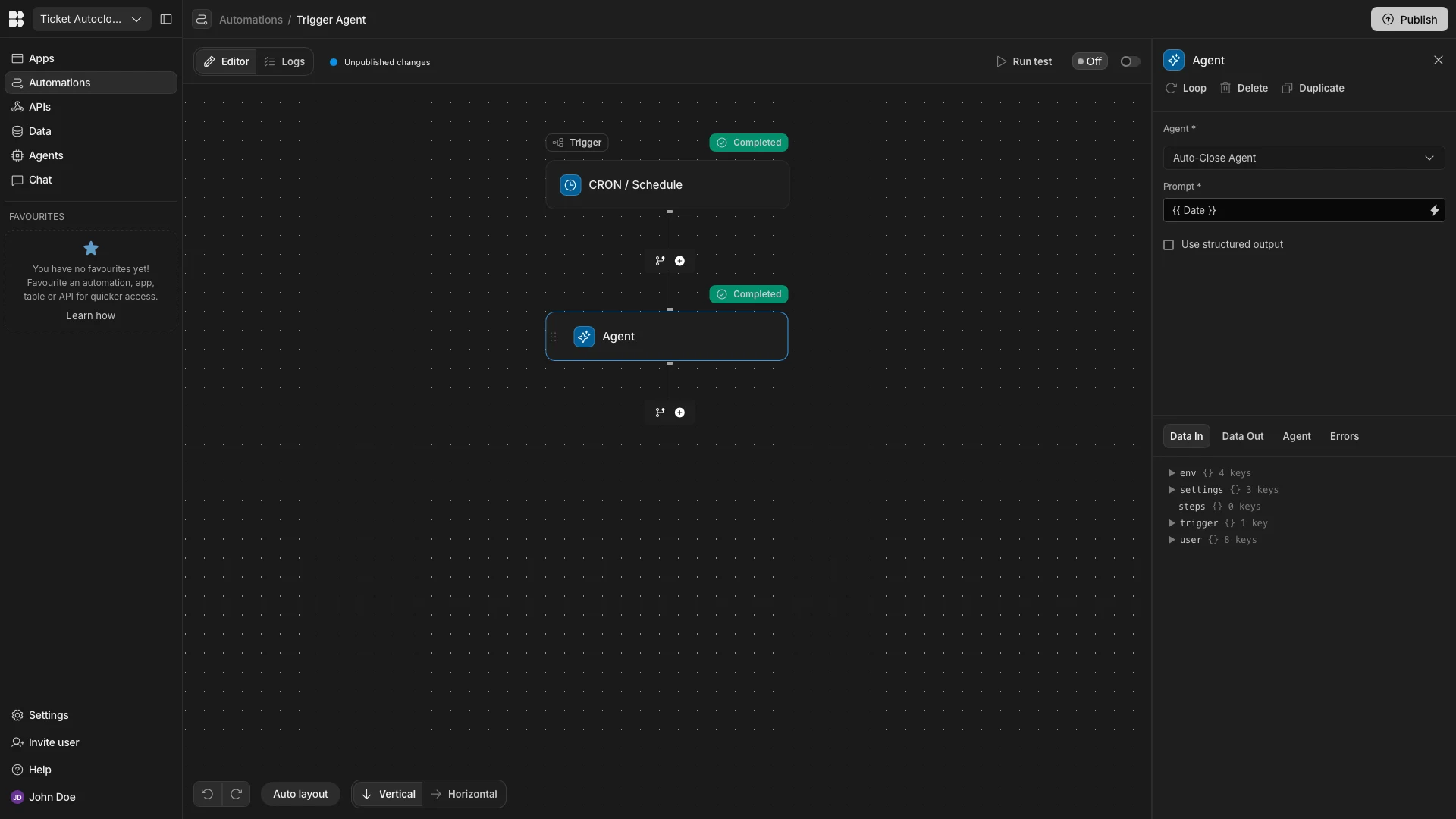
This automation turns the ticket review into a background process: each morning, the agent checks all open tickets, decides whether any need follow-up, and records its outcome.
Send email
The second automation is called Send Email. The agent invokes this automation when it chooses NUDGE_INTERNAL or NUDGE_CUSTOMER.
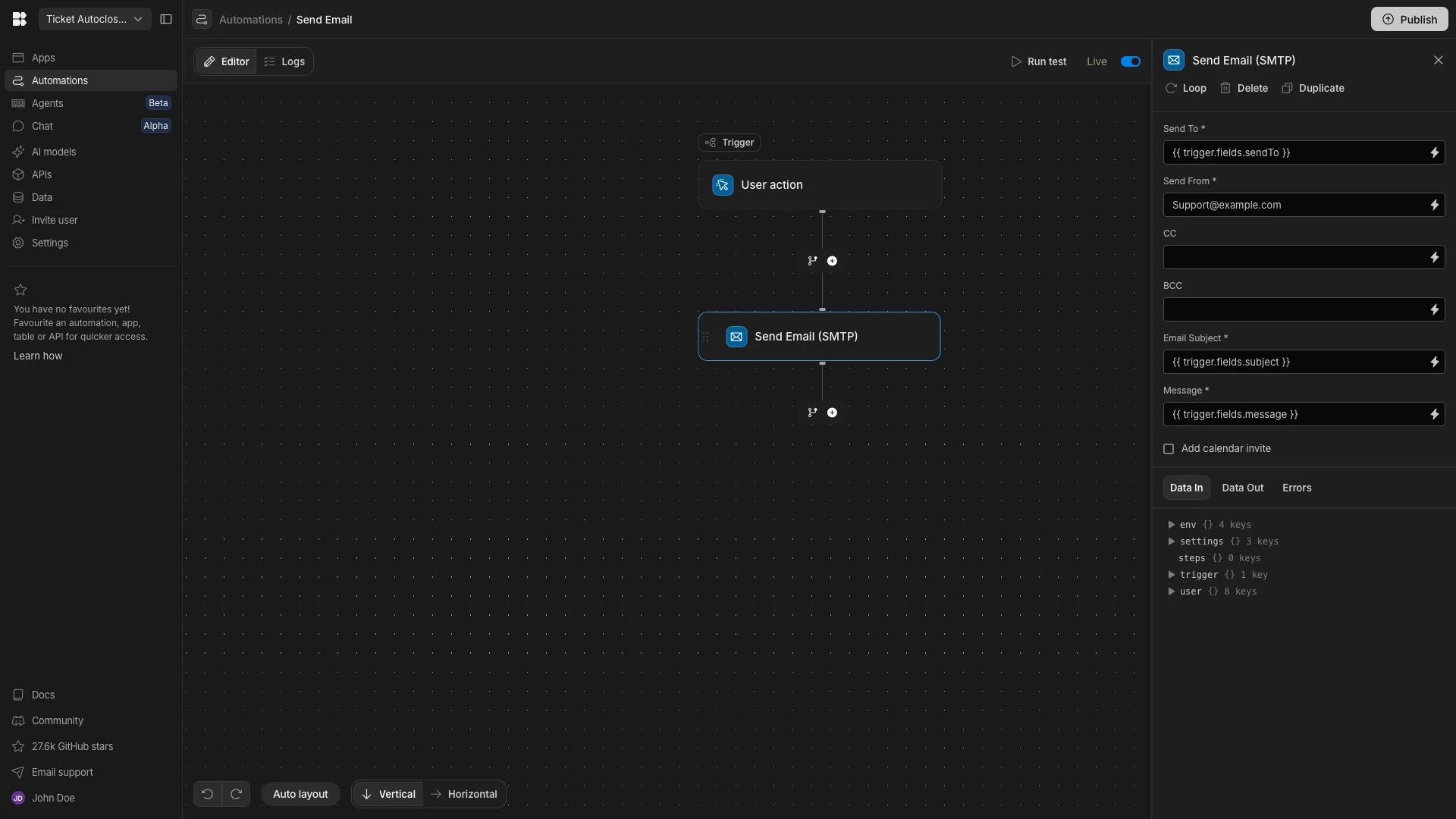
This flow uses a User Action trigger with the following fields:
sendTosubjectmessage
That trigger is followed by a Send Email (SMTP) action with these bindings:
Send To-{{ trigger.fields.sendTo }}Email Subject-{{ trigger.fields.subject }}Message-{{ trigger.fields.message }}
Set Send From to a static support mailbox address. With that in place, the agent can choose the right recipient and send a reminder without a human having to work through the backlog manually.