

Overview
Internal knowledge assistants are one of the most common use cases for agentic AI. In most companies, information about policies, systems, and internal processes is spread across multiple tools, which makes it harder for employees to find answers and increases routine workload for support teams.
This guide shows how to build an AI-powered assistant in Budibase Agents that retrieves answers from external knowledge sources instead of relying on model memory. The result is a grounded assistant that can answer questions, cite its source, and fall back cleanly when the documentation is relevant but not explicit.
What are we building?
- A Budibase Agent that accepts natural-language questions from employees.
- A routing layer that decides whether the question belongs to IT, HR, operations, or onboarding.
- A retrieval flow that uses GitHub for IT knowledge and Notion for HR, operations, and onboarding knowledge.
- A response pattern that cites the supporting document or directs the user to the right source when no clear answer is present.
Here is the high-level logic:
- Users can submit questions about IT, HR, operations, and onboarding in natural language.
- The agent classifies the query before any retrieval happens.
- IT questions use GitHub document discovery and content retrieval.
- HR, operations, and onboarding questions use a Budibase table to look up the right Notion page ID before calling the Notion API.
- The agent can retry classification in overlapping or ambiguous cases.
- When a definitive answer is available, the response includes a citation.
- When the document is relevant but non-definitive, the user is directed to the authoritative source.
- When no useful documentation is found, the user is told to contact the appropriate support team.
To build along with this guide, you need a Budibase workspace plus access to GitHub and Notion. The example resources used here can be swapped out for your own documentation sources.
We’ve created this example workflow to help you get started building your own Internal Knowledge Assistant.
Agent instructions
Start with a fresh Budibase workspace and connect an LLM under AI Config. Budibase supports any model exposed through an OpenAI-compatible API, including cloud-hosted and self-hosted options. In this example, the agent uses Budibase AI.
Once the model is available in the builder, define the agent’s behavior in the Instructions editor. The prompt below is adapted from the source guide and is the core of the workflow:
Agent role
The agent is an internal company knowledge assistant. Its responsibility is to answer employee questions by selecting the correct knowledge domain, retrieving information from the appropriate system of record, and responding strictly from documented sources.
The organization uses multiple knowledge sources:- IT knowledge is stored in GitHub- HR, Operations, and Onboarding knowledge is stored in Notion
Inputs- The user's question- Access to Notion retrieval tools and APIs- Access to GitHub retrieval tools and APIs- Retrieved document content when available- Document metadata when available (page title, section heading, document URL)
Actions- Determine the topic of the user's question- Map the question to the correct knowledge domain- Use the corresponding retrieval mechanism- Extract relevant information from retrieved documents- Generate a response grounded strictly in retrieved content
Domain Selection LogicClassify the user's request before retrieval:- Questions about systems, devices, software, access, security, passwords, incidents, technical issues -> Use GitHub (IT knowledge)- Questions about working hours, leave, attendance, policies, conduct, remote work -> Use Notion (HR knowledge)- Questions about processes, approvals, documentation, meetings, workflows, escalations -> Use Notion (Operations knowledge)- Questions about new hires, onboarding, training, initial access, first-day issues -> Use Notion (Onboarding knowledge)- If retrieval is unsuccessful or the domain of the request is ambiguous, reclassification can be attempted
Retrieval Strategy- Select the knowledge domain before retrieving documents- Retrieve the most relevant document or documents from the appropriate source- Prefer extracting precise answers when clearly available- If relevant documents exist but do not contain a clear, explicit answer, provide a navigation response directing the user to the authoritative document- The retrieval flow may be retried up to two times if the initial classification is wrong
Retrieving Documents From GitHub- Use api.github.git/get-tree to search available knowledge base articles and identify candidates based on title and path- Use api.github.repos/get-content with the selected path to inspect the best match and return its URL- Do not repeat content lookup more than three times before using fallback behavior
Retrieving Documents From Notion- Retrieve names and notion_ids using budibase.Notion Pages.list_rows- Use the selected id as page_id in api.notion.Page_getPage to retrieve the source URL- Use the same id as block_id in api.notion.Block_getChildren to retrieve page contents
Fallback Behavior- Do not speculate or infer- Do not state that the information is missing or incomplete- Direct the user to the most relevant document or page when no explicit answer is available
OutputStandard responses must follow this structure:AnswerProvide a concise, factual response derived strictly from retrieved documents.SourceReference the supporting document, page, or section heading when available. Print the full URL.
Fallback navigation responses:AnswerThe requested information is documented in the following resource:[Document Title / Link]Source[Document Title]
If no relevant documentation is found:AnswerI cannot find this information in the knowledge base.
Rules- Only use retrieved content from the selected knowledge source- Do not rely on prior knowledge or undocumented assumptions- Do not guess, infer, or fabricate policies or procedures- Prefer explicit document statements over interpretation- Use fallback navigation when documents are relevant but non-definitive- Maintain a neutral, professional tone- Do not provide opinions, advice, or undocumented explanations- Do not reference internal retrieval limitations or document quality- Never invent URLs- For all GitHub API requests owner = { example-owner } and repo = { example-repo }
This prompt gives the agent a clear contract: classify first, retrieve from the right system of record, answer only from returned content, and avoid improvising when the docs are vague.
API requests
This workflow relies on four external tool calls across GitHub and Notion, plus one BudibaseDB table that stores the Notion page mapping. The guide uses Budibase REST templates, which provide prebuilt endpoint definitions for popular integrations that you can configure with your own authentication and defaults.
The retrieval split is simple:
- GitHub handles IT documentation discovery and content retrieval.
- Notion handles HR, operations, and onboarding documentation lookup and content retrieval.
- BudibaseDB stores the page name to
notion_idmapping needed by the Notion requests.
GitHub
The GitHub side uses two endpoints from the GitHub REST template:
git/get-treereturns the repository file structure, including document names and paths.repos/get-contentreturns the contents of a specific document using the selectedpath.
Configure git/get-tree with these default values inside Budibase:
owner: the GitHub organization or usernamerepo: the repository nametree_sha: the file tree identifier, which can be retrieved fromrepos/get-branchfor the main branchrecursive:1
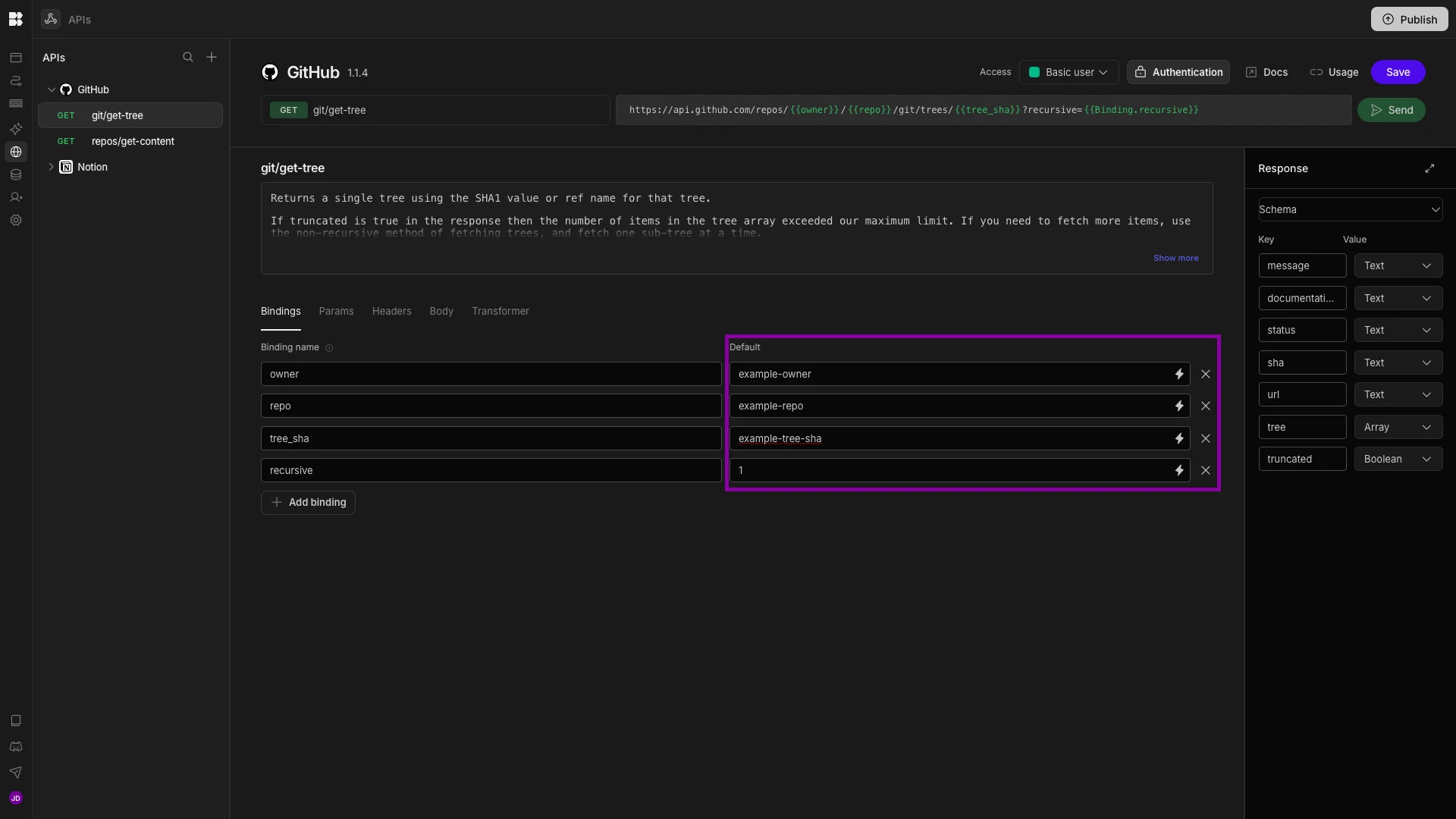
The repos/get-content request requires:
ownerrepopath
In this pattern, the agent uses git/get-tree once to discover candidate documents, then uses repos/get-content to inspect likely matches. Keep the content lookup capped at three attempts so the assistant moves to fallback behavior instead of looping indefinitely.
The sample repo in the guide is a flat set of markdown documents. A typical troubleshooting article looks like this:
# VPN TroubleshootingIf you are unable to connect to the VPN, first verify that your internet connection is active and stable. VPN connectivity requires a working network connection, so confirm that you can access external websites before proceeding. If your connection is functioning normally, disconnect and reconnect the VPN client. Temporary session issues may prevent successful authentication. If the VPN displays an error or repeatedly disconnects, restart your device to clear any network or client-related conflicts.
If problems persist, ensure that you are using your assigned company credentials and that multi-factor authentication (MFA) requests are approved when prompted. Authentication failures are a common cause of VPN connection errors. Additionally, confirm that no local firewall or security software is blocking the VPN client. If the VPN continues to fail after these checks, capture the exact error message and report the issue through the Helpdesk Portal. Providing the error details will help IT diagnose and resolve the VPN failure more efficiently.
Because repos/get-content returns base64-encoded content, add a transformer to decode the file before passing it to the agent:
function b64decode(str) {  const chars = "ABCDEFGHIJKLMNOPQRSTUVWXYZabcdefghijklmnopqrstuvwxyz0123456789+/";  let out = "", buffer = 0, bits = 0;  str = (str || "").replace(/\n/g, "");  for (let i = 0; i < str.length; i++) {    const c = str[i];    if (c === "=") break;    const val = chars.indexOf(c);    if (val < 0) continue;    buffer = (buffer << 6) | val;    bits += 6;    if (bits >= 8) {      bits -= 8;      out += String.fromCharCode((buffer >> bits) & 0xff);    }  }  return out;}
return {  html_url: data.html_url,  path: data.path,  name: data.name,  decoded_content: b64decode(data.content)};
Notion
For Notion, use two API requests:
Page_getPageto fetch the public URL for a pageBlock_getChildrento fetch the page body
Both requests use the Notion page ID stored in Budibase:
- pass the value as
page_idtoPage_getPage - pass the same value as
block_idtoBlock_getChildren
The raw Block_getChildren response includes a lot of page metadata and formatting information. Instead of sending the full payload to the model, use a transformer to extract only the headings and their paragraph text:
const sections = [];let current = null;for (const b of (data.results || [])) { if (b.type === "heading_2" || b.type === "heading_3") { current = { heading: b[b.type].rich_text.map(t => t.plain_text).join(""), body: "", heading_id: b.id }; sections.push(current); continue; } if (!current || b.type !== "paragraph") continue; const text = b.paragraph.rich_text.map(t => t.plain_text).join(""); if (!text) continue; current.body += (current.body ? "\n" : "") + text;}return sections.filter(s => s.body);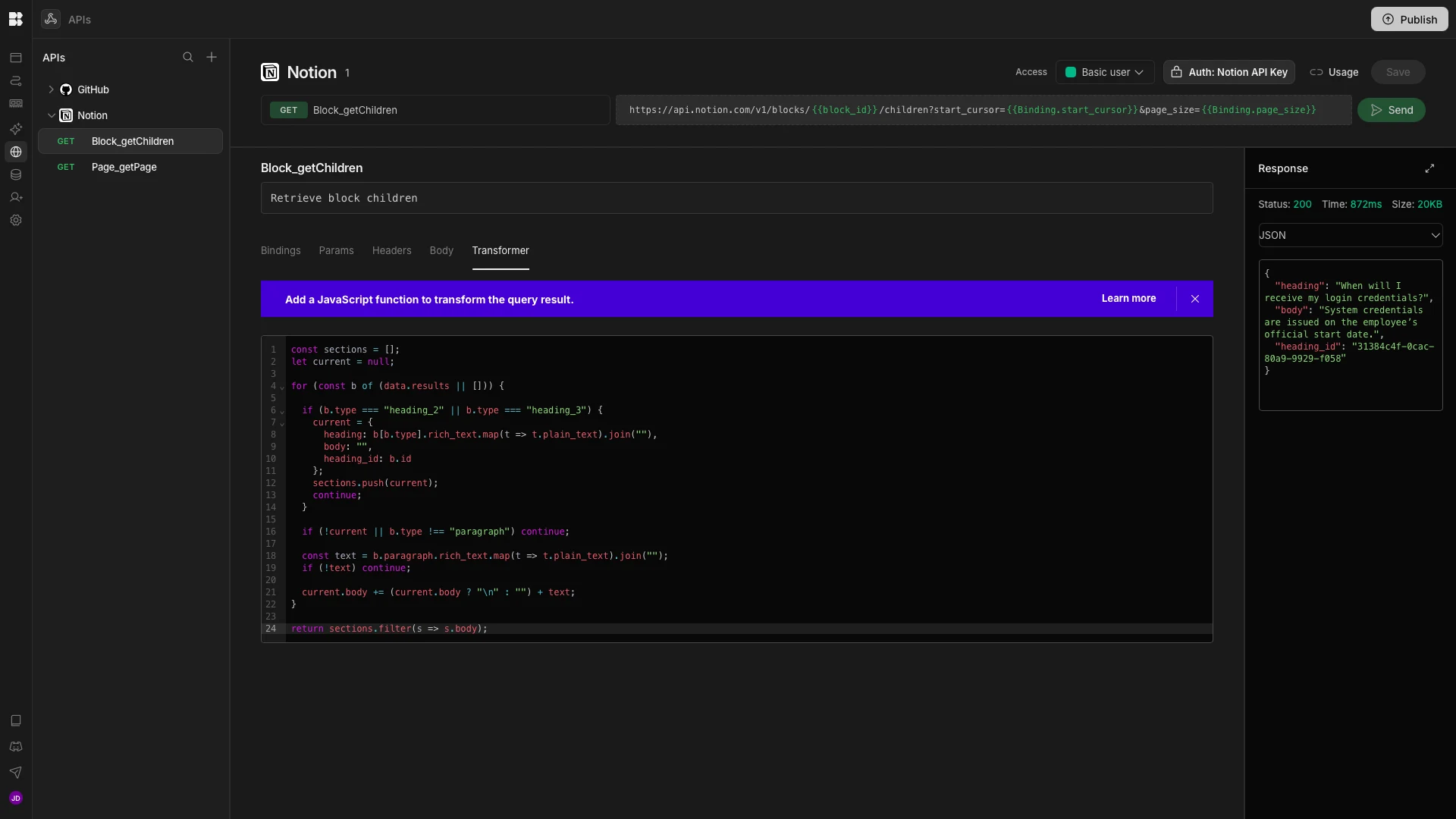
That transformer returns a compact structure like:
{ "heading": "When will I receive my login credentials?", "body": "System credentials are issued on the employee's official start date.", "heading_id": "exampleHeadingId"}In the example setup, the agent can access three Notion pages:
HR PolicyOnboarding FAQsOperations Manual
An excerpt from the operations documentation looks like this:
# Operations Manual**Last Updated:** 2026-01-01**Owner:** Operations---## Approvals & AuthorizationsFormal approvals must be recorded in the ticketing system.Approvals provided via chat, email, or verbal agreement are not valid.---## Communication ChannelsSlack is used for day-to-day coordination and discussion.Decisions and commitments must be documented in the appropriate system of record.Tables
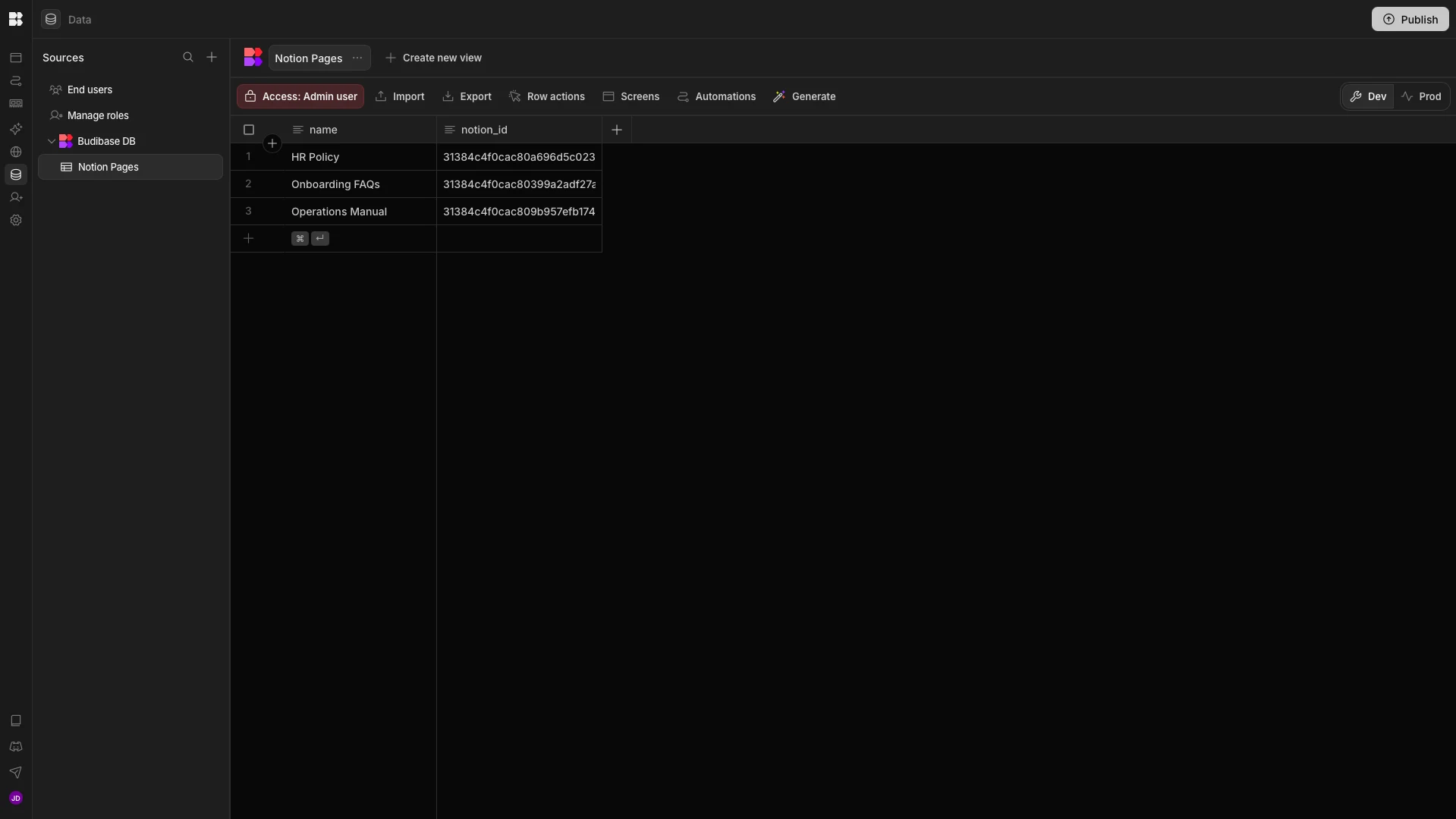
Our Agent also requires a single BudibaseDB table called Notion Pages to function correctly. This is queried by our agent using budibase.Notion Pages.list_rows. The table stores two attributes relating to each of our Notion Pages:
name - the name of the document which can be referenced by the Agent.
notion_id - the unique identifier of the document, which is required to retrieve it via our two API requests.
You can create this by importing the following CSV into BudibaseDB, setting the Type for each column to Text. You’ll need to provide the real notion_id values for each page you wish to query using the Agent.
name,notion_idexample_name,example_idReplace the placeholder IDs with real page identifiers for each document you want the agent to search.
Invoking the agent
As our internal knowledge assistant is a conversational Agent, we have a few options for how we can serve it to end users. For example, we can invoke Agents from within Budibase Automations. For this use case, we might opt to use the Email Received Automation trigger to integrate our knowledge assistant with an internal support inbox, along with a Send Email (SMTP) action to enable our Agent to send a response to users. Take a look at our email listener documentation to learn more.
Alternatively, we have a couple of options for serving our Agent to users within chat-based UIs. Budibase Agents support deployment via external chat tools, including Discord and Teams, enabling end users to interact with them via existing messaging channels. We can configure this under our Agent’s Deployment tab.
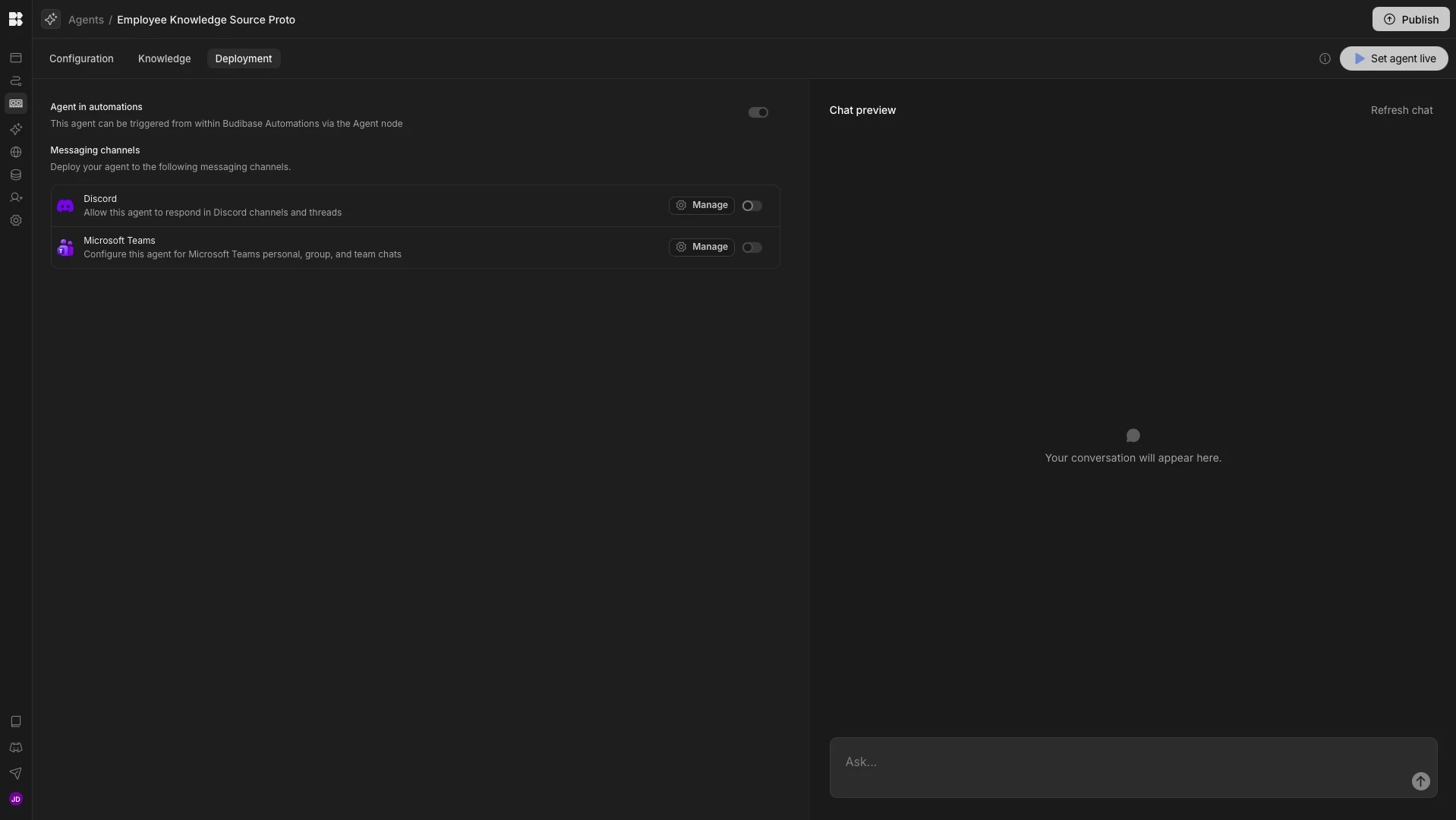
Budibase Agents also offer native chat capabilities, providing a ready-to-use, authenticated conversational interface that we can serve to end users, enabling them to interact with our knowledge assistant directly.