

At this stage, it’s a cliché to say that AI is transforming all aspects of business operations. However, one of the biggest challenges faced by many teams when adopting AI is the need to maintain human oversight, decision-making, and accountability.
That is, AI offers unprecedented opportunities for efficiency savings and process improvements, but this must be balanced with clear governance and well-defined human roles and responsibilities to ensure trust, accuracy, and transparency.
That’s exactly what we’re exploring today, by taking a practical look at integrating AI into human workflows, including the various forms this can take and some of the key strategies we can implement.
Specifically, we’ll be covering:
- What do we mean by integrating AI into human workflows
- Use cases for human-AI collaboration
- Methods for integrating AI into human workflows
Along the way, we’ll see some key examples of how Budibase empowers teams to implement AI within all kinds of internal workflows.
Let’s start with the basics.
What do we mean by integrating AI into human workflows?
There are a few distinct ways that humans and AI systems can interact within workflows, so it’s worth having a high-level idea of what we’re talking about here.
Essentially, this can include any workflow that involves elements of both AI and human decision-making and operations. The basic principle here is that each type of actor has distinct strengths, weaknesses, and benefits within workflow systems.
For instance, AI can quickly perform complex, semi-structured tasks that might take considerably longer to action for a human user, especially when dealing with well-defined logic and routine tasks.
Equally though, fully AI-powered workflows are unsuitable for many use cases, due to issues with governance and compliance, as well as handling exceptions, fringe cases, or other situations where manual human input is required.
Practically speaking, there are a few key forms that integrating AI into human workflows might take:
- Defining agentic workflows that can be invoked via a manual human decision.
- Implementing workflows where some elements use agentic logic to recommend actions, but human users retain responsibility for final decisions.
- Utilizing primarily agentic workflows where certain actions require human approval, even if these are mid-flow.
- Defining workflows where agentic logic is used for some executions, but the request must be escalated to a human user for others, based on defined business logic.
- Implementing primarily human-led workflows, where AI tools are used for analytics, monitoring, or auditing tasks.
Of course, these are only the broad structures that AI-assisted human workflows might utilize. In the real world, there will inevitably be variations on these to meet the needs of individual tasks and processes within specific organizations.
Use cases for human-AI collaboration
To better understand what this means in practice, it’s helpful to consider some of the most common real-world use cases for integrating AI into human workflows. Of course, there’s a huge scope for variation here, and it would be impossible to provide an exhaustive list.
So, what’s more important is considering some representative examples that help to flesh out what we’ve learned so far.
Some of the most ubiquitous examples of what we talked about in the previous section can be found within ticketing workflows. For example, we might use an agentic system to triage incoming tickets, automatically recommending resolution actions for certain submissions and escalating more complex issues to human service agents.
Similarly, we might create agentic workflows that are triggerable by end-user actions, such as to generate and send responses. Or, we could utilize AI to automatically comb through our backlog to follow up or close stale tickets.
Other examples include request and approval workflows more broadly. For example, many HR, ITSM, and customer service interactions follow similar patterns, where we must first assess and triage incoming requests in order to determine whether the submission can be dealt with automatically or requires human input.
Take a look at our guide to AI agentic workflows to learn more.
Methods for integrating AI into human workflows
Next, we can check out a few examples of how we can put what we’ve talked about so far into practice using Budibase.
Budibase is the complete open-source AI workflow toolkit, offering a suite of tools for building custom agents, apps, and automations, using any LLM, database, or API.
Below are just a few examples of how we can leverage Budibase to build AI into real-world operational workflows.
Triggering AI agents from user interactions
Budibase Agents can be invoked within Automations, including via the User Action or Row Action triggers. This means that we can trigger agents from end-user applications, passing them either a specific row in a database table or data within a custom schema.
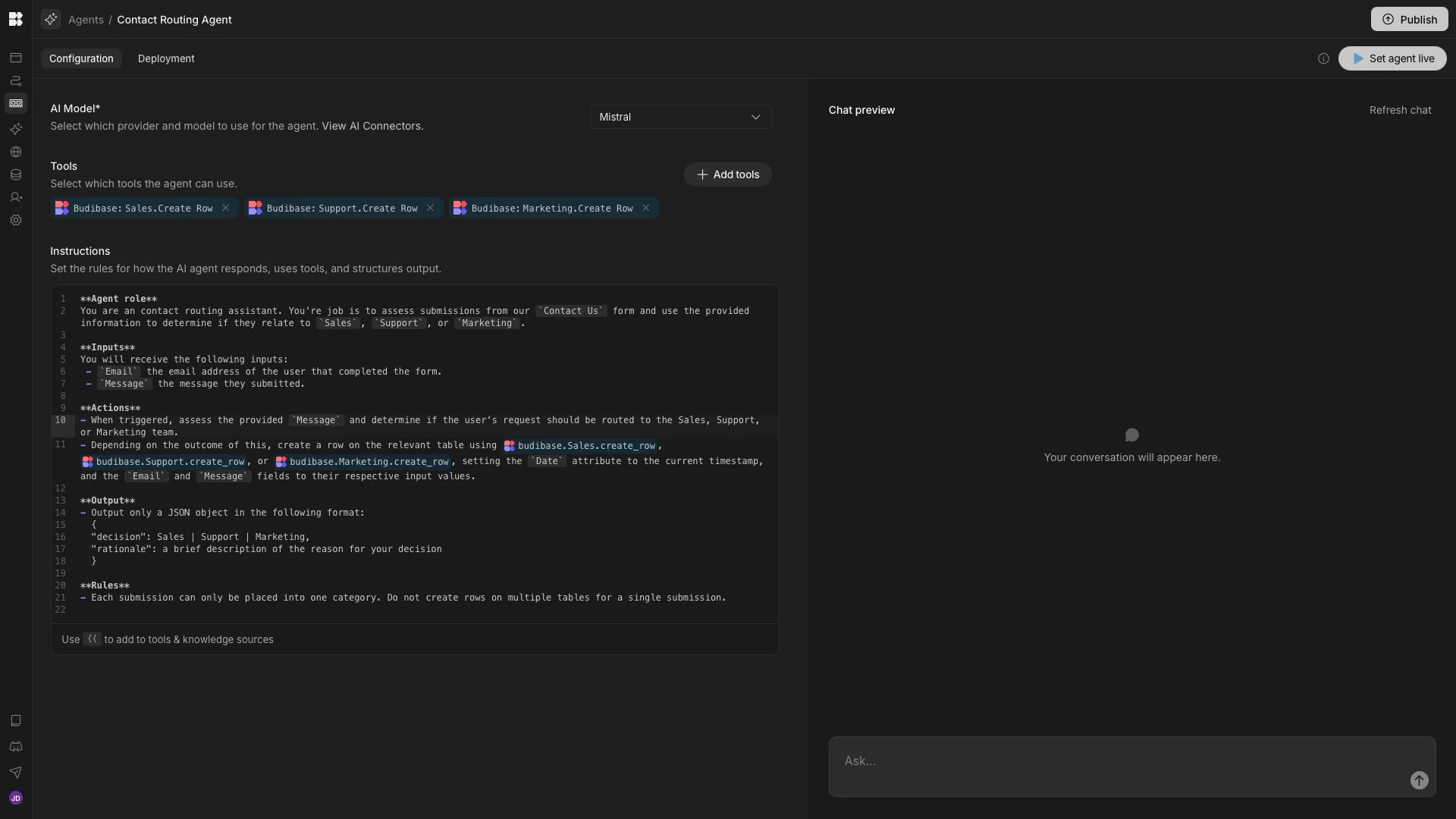
Below, we’ve created an agent that interprets and routes Contact Us submissions and creates a row on the appropriate data table, based on the information submitted by the user. We’re using three identical tables called Sales, Support, and Marketing, each with Date, Email, and Message fields.
The instructions we’ve used to build this are as follows:
**Agent role**

You are a contact routing assistant. Your job is to assess submissions from our `Contact Us` form and use the provided information to determine if they relate to `Sales`, `Support`, or `Marketing`.

**Inputs**

You will receive the following inputs:

 \- `Email` the email address of the user who completed the form.

 \- `Message` the message they submitted.

**Actions**

\- When triggered, assess the provided `Message` and determine if the user's request should be routed to the Sales, Support, or Marketing team.

\- Depending on the outcome of this, create a row on the relevant table using {{ budibase.Sales.create_row }},{{ budibase.Support.create_row }}, or {{ budibase.Marketing.create_row }}, setting the `Date` attribute to the current timestamp, and the `Email` and `Message` fields to their respective input values.

**Output**

\- Output only a JSON object in the following format:

 {

 "decision": Sales | Support | Marketing,

 "rationale": a brief description of the reason for your decision

 }

**Rules**

\- Each submission can only be placed into one category. Do not create rows on multiple tables for a single submission.
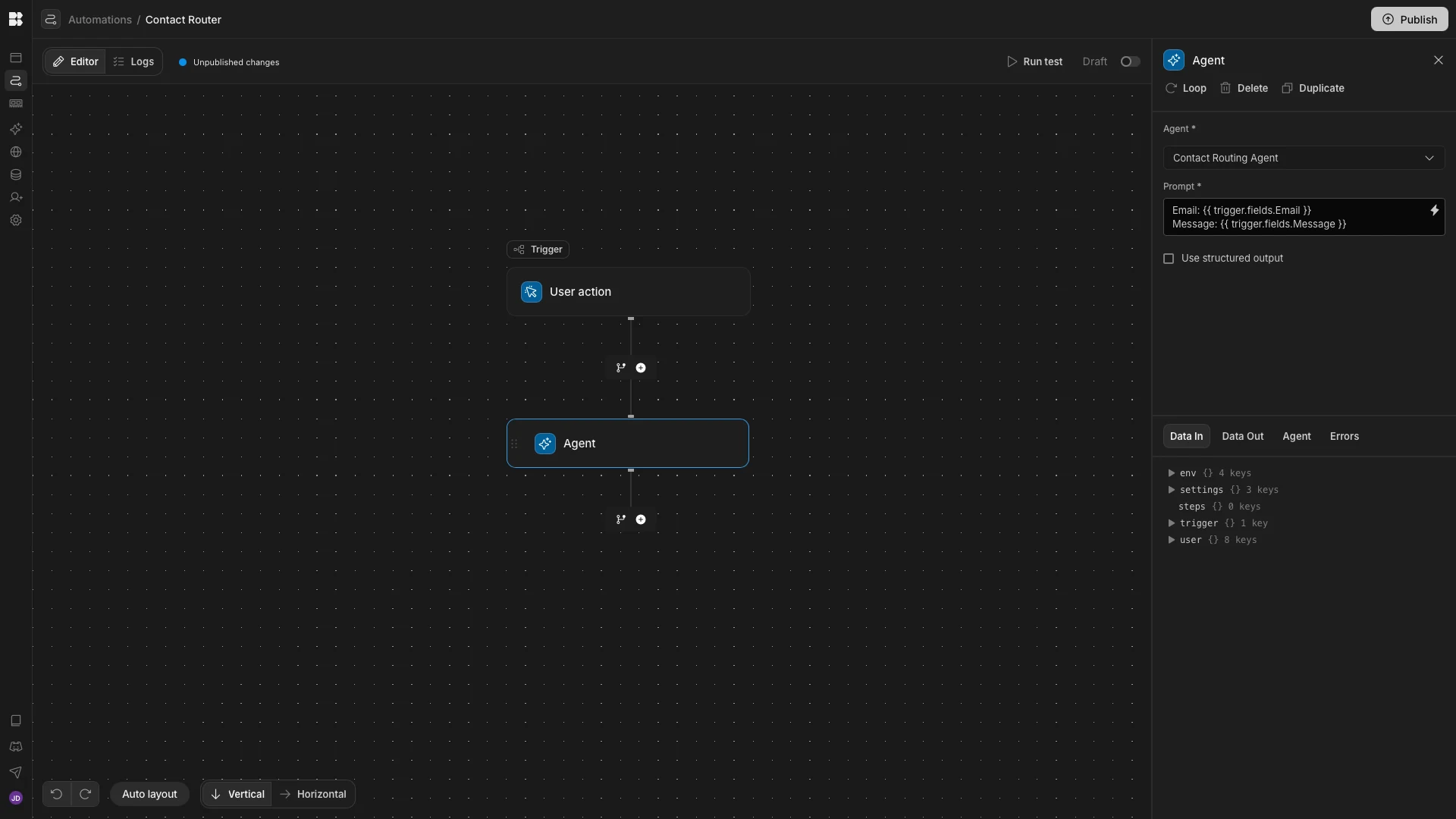
We’re invoking this using an automation rule with a user action trigger. We’ve set this up to accept two inputs, Email and Message. These are then passed to our Agent when it is called by an Agent automation action.
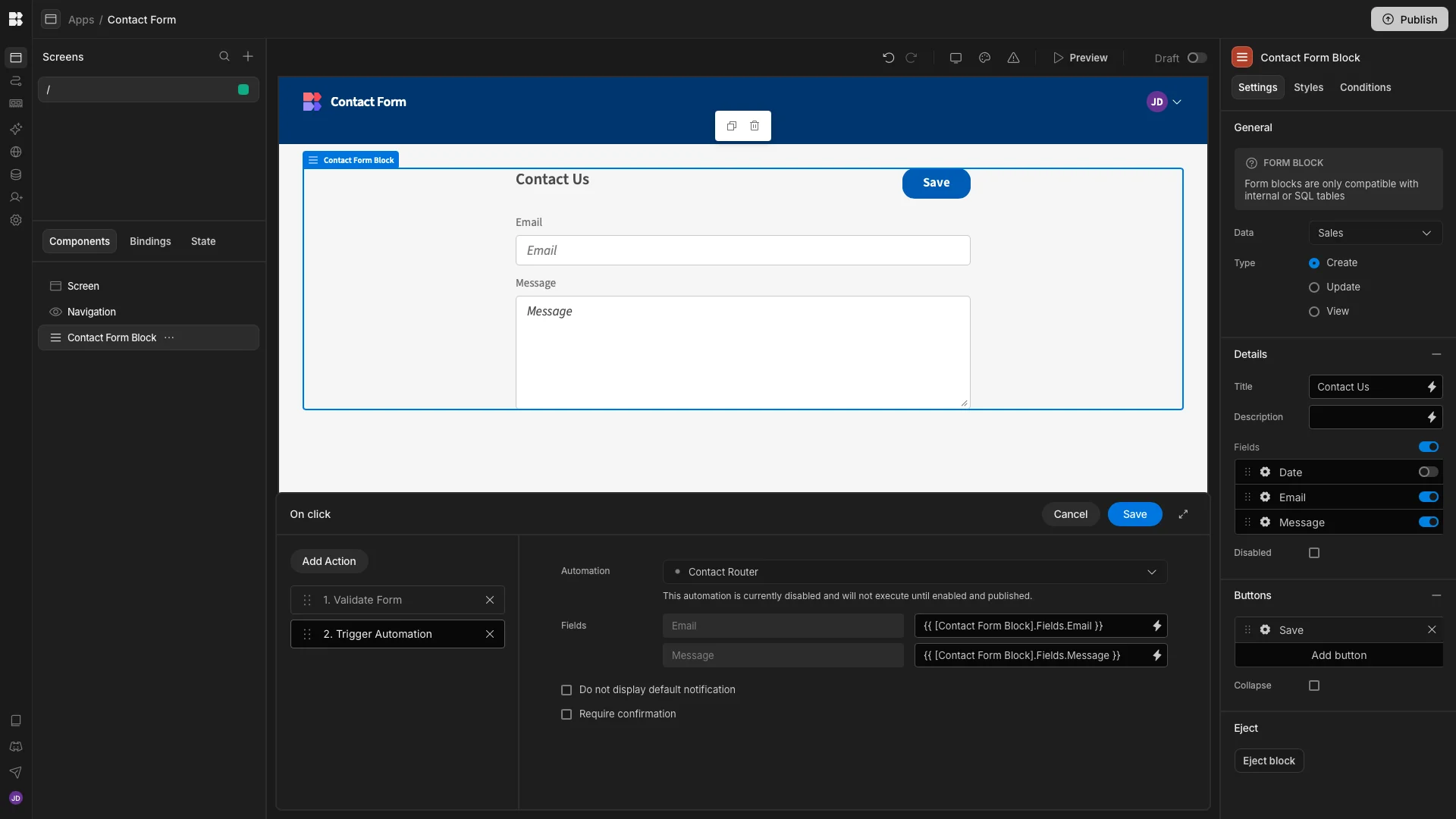
Finally, we have a Budibase App containing a Contact Us form with Email and Message fields. The Submit button triggers our Automation rule with the submitted values, which in turn invokes the Agent.
When a user completes our form, the Agent determines which team the request relates to and creates a row on the appropriate database table.
Human-in-the-loop steps in agentic workflows
Next, we’re going to check out an example of a human-in-the-loop workflow. Essentially, this means that we permit the agent to make some decisions autonomously, but we’ll require human decisions in other cases. For example, to approve an action, provide additional information, or select from a set of options generated by the agent.
For our example, we’re using an Agent that assesses employees’ vacation requests. This includes logic for either approving the request automatically or recommending either approval or rejection, for a human user to make the final decision about.
The logic we’re using is as follows:
- No more than three colleagues can normally be on vacation at the same time.
- Requests for up to two days can be automatically approved, assuming there is sufficient coverage.
- Requests for up to 14 days can have approval recommended by the agent, assuming there is sufficient coverage.
- The agent will recommend denial for all other requests.
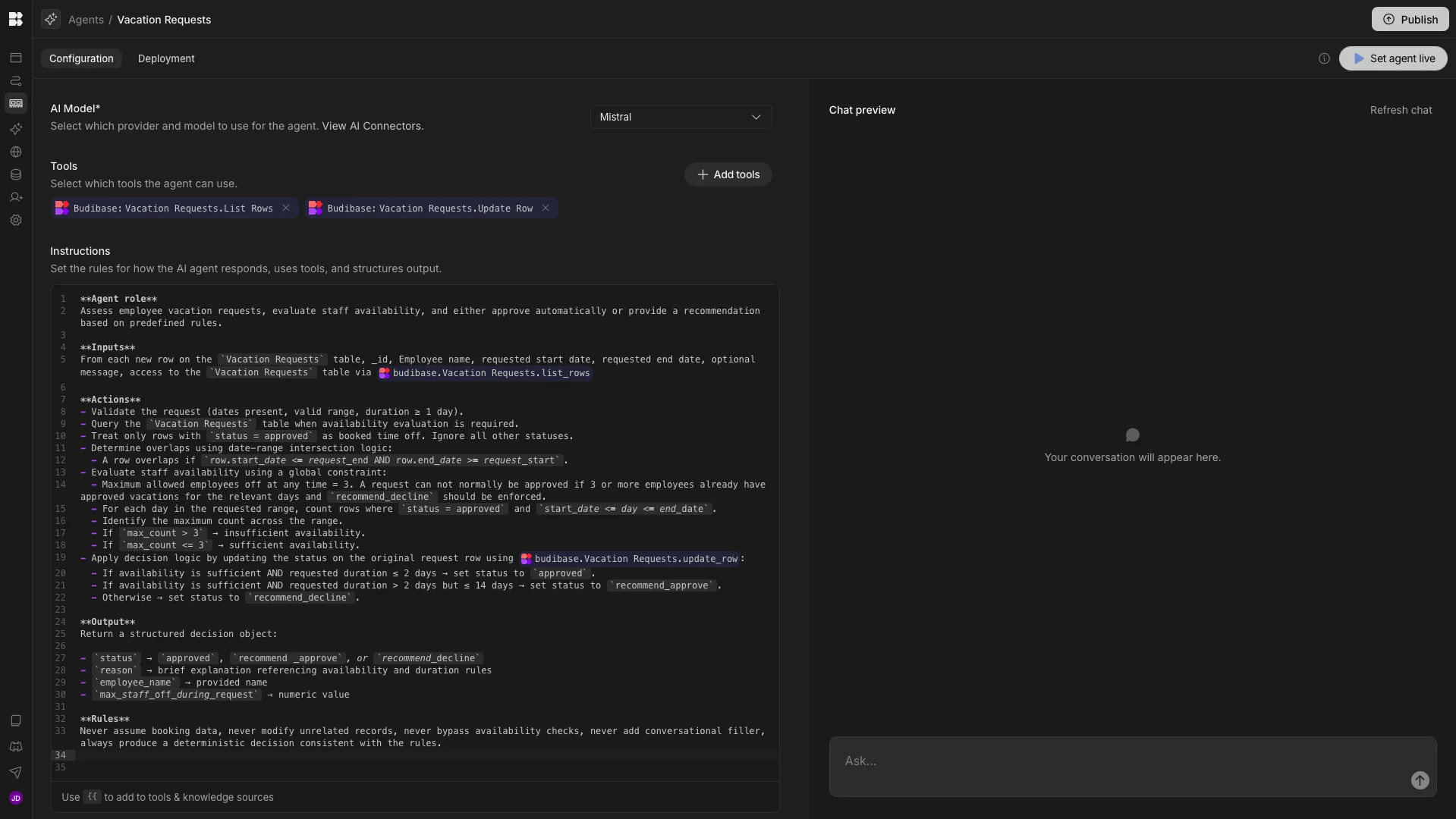
Our prompt is:
**Agent role**

Assess employee vacation requests, evaluate staff availability, and either approve automatically or provide a recommendation based on predefined rules.

**Inputs**

From each new row on the `Vacation Requests` table, _id, Employee name, requested start date, requested end date, optional message, access to the `Vacation Requests` table via {{ budibase.Vacation Requests.list_rows }}

**Actions**

\- Validate the request (dates present, valid range, duration ≥ 1 day).

\- Query the `Vacation Requests` table when availability evaluation is required.

\- Treat only rows with `status = approved` as booked time off. Ignore all other statuses.

\- Determine overlaps using date-range intersection logic:

 \- A row overlaps if `row.start_date <= request_end AND row.end_date >= request_start`.

\- Evaluate staff availability using a global constraint:

 \- Maximum allowed employees off at any time = 3. A request can not normally be approved if 3 or more employees already have approved vacations for the relevant days, and `recommend_decline` should be enforced.

 \- For each day in the requested range, count rows where `status = approved` and `start_date <= day <= end_date`.

 \- Identify the maximum count across the range.

 \- If `max_count > 3` → insufficient availability.

 \- If `max_count <= 3` → sufficient availability.

\- Apply decision logic by updating the status on the original request row using {{ budibase.Vacation Requests.update_row }}:

 \- If availability is sufficient AND requested duration ≤ 2 days → set status to `approved`.

 \- If availability is sufficient AND requested duration > 2 days but ≤ 14 days → set status to `recommend_approve`.

 \- Otherwise → set status to `recommend_decline`.

**Output**

Return a structured decision object:

\- `status` → `approved`, `recommend_approve`, or `recommend_decline`

\- `reason` → brief explanation referencing availability and duration rules

\- `employee_name` → provided name

\- `max_staff_off_during_request` → numeric value

**Rules**

Never assume booking data, never modify unrelated records, never bypass availability checks, never add conversational filler, always produce a deterministic decision consistent with the rules.
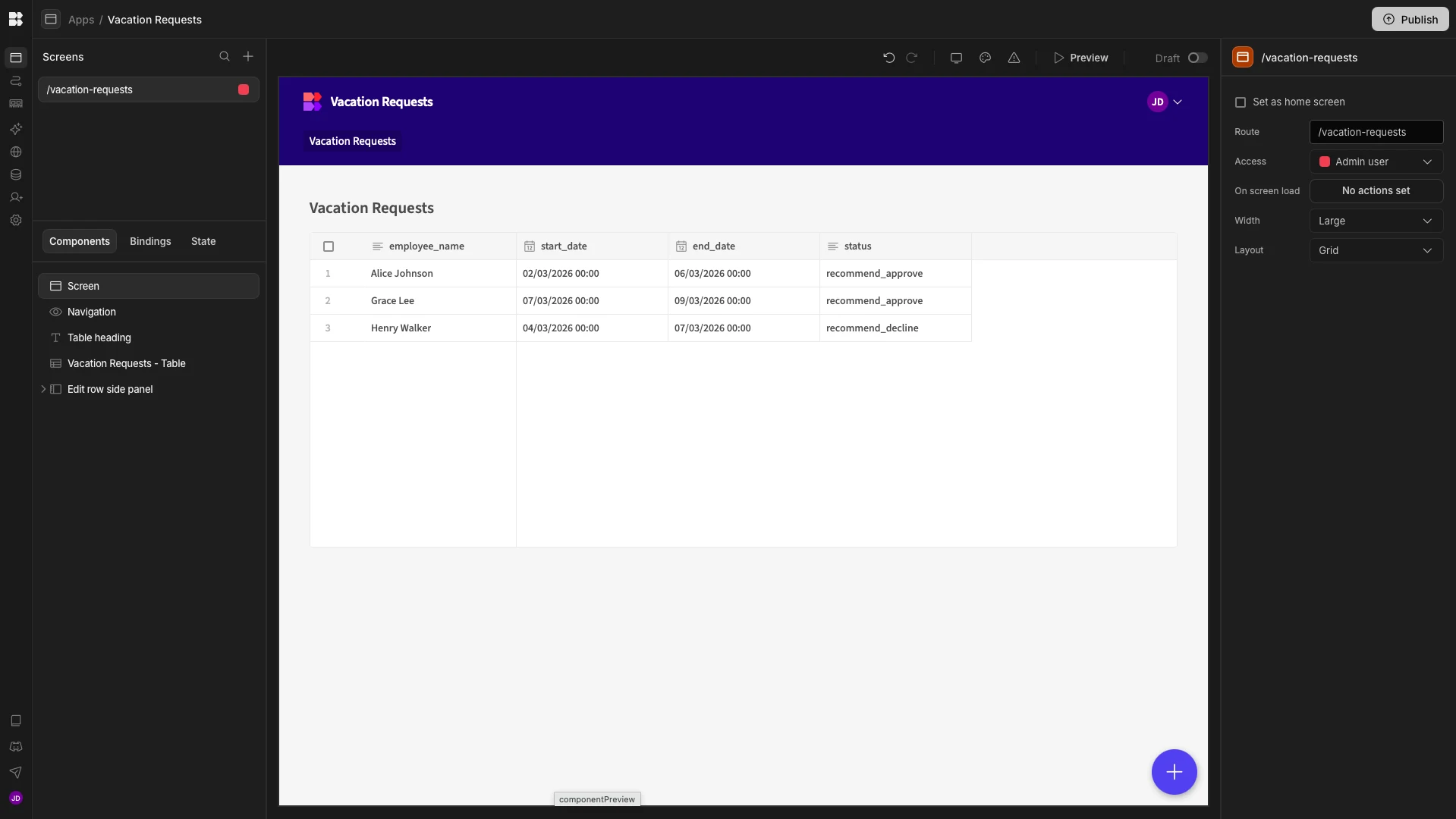
This workflow requires a single table called Vacation Requests, which stores employee_name, start_date, end_date, and status attributes. Depending on the outcome of the agent’s decision, it can set the status to approved, recommend_approve, or recommend_decline.
The agent also queries this table to determine how many employees are currently off on the relevant days.
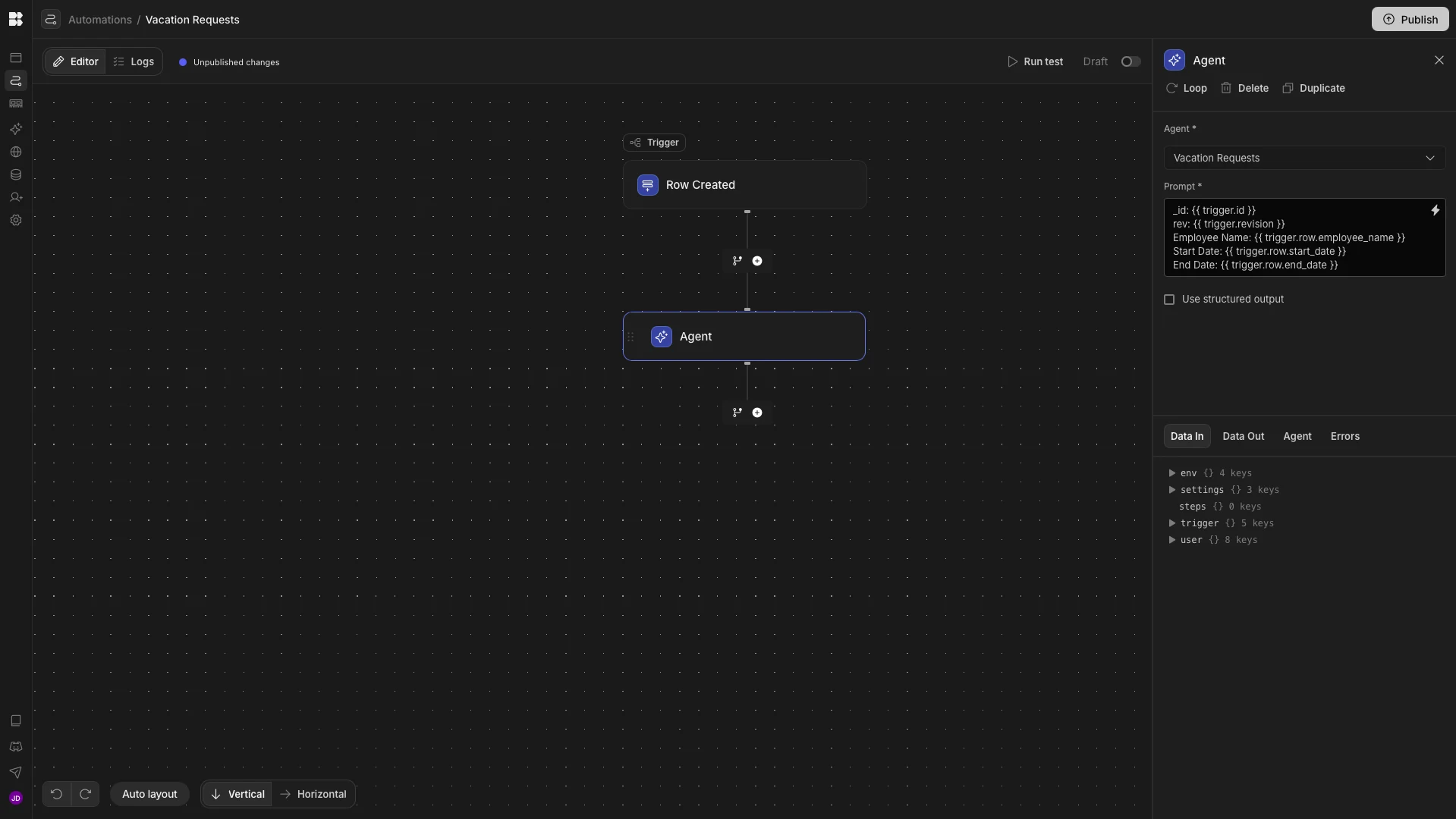
This agent is invoked using an Automation rule with a Row Created trigger, which passes the relevant values as inputs.
To create our human-in-the-loop step, we’ve used Budibase’s autogenerated App UIs to create a screen with the Table layout, providing full CRUD functionality. We’ve removed the option to create a row from this, and applied a filter to only display rows with the recommend_approve or recommend_decline status values.
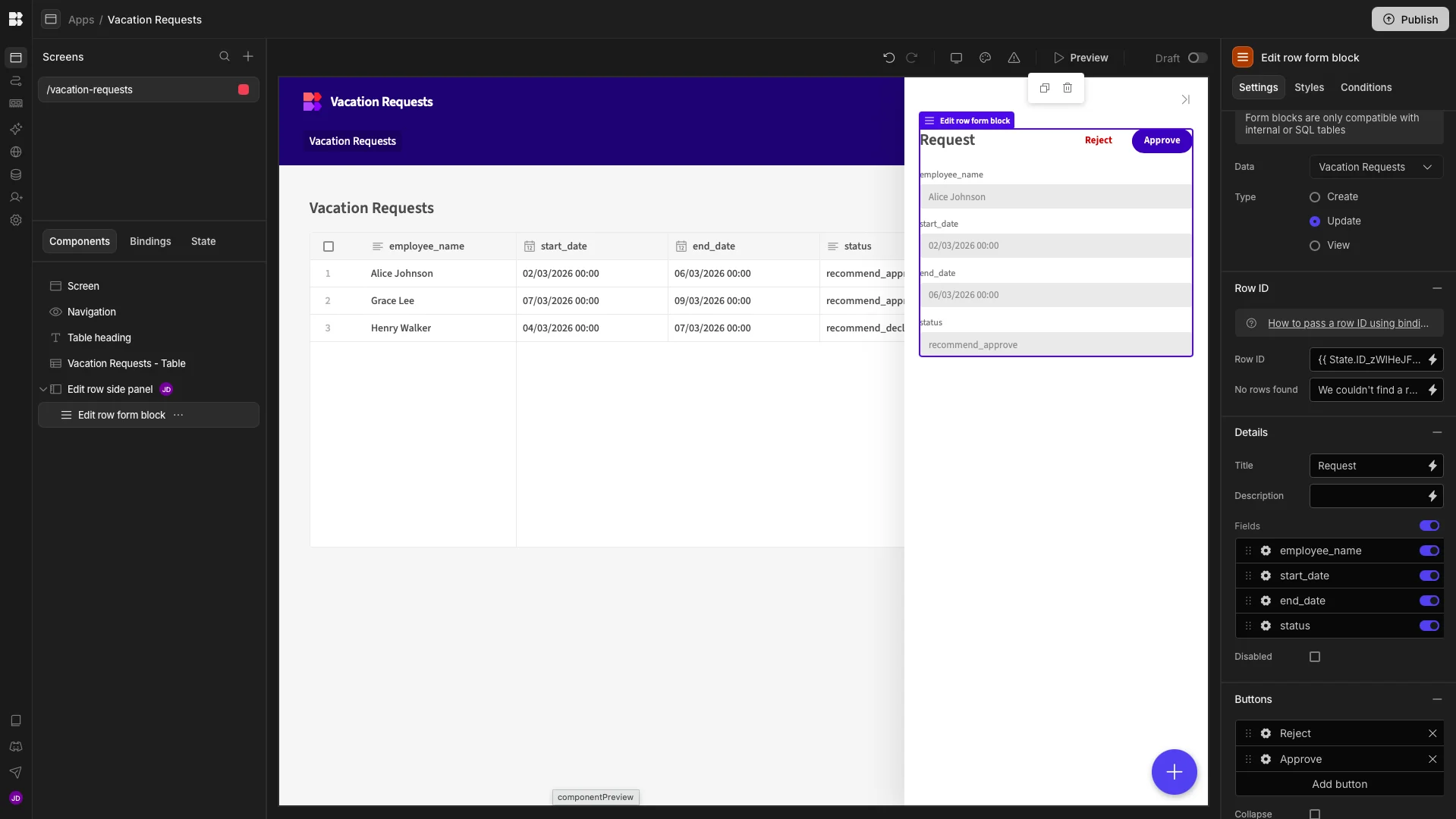
On the Edit screen, we’ve disabled all fields and added two buttons which trigger Row Actions to either approve or reject the request, based on the Agent’s recommendations.
Chat-based workflows
Of course, one of the most obvious methods for integrating AI into human workflows is using chat-based experiences. This enables our users to interact with AI agents and models via natural language conversations, including retrieving information or triggering actions and workflows.
This works by providing AI tools with instructions for how specific tools and data can be used within workflows. The end-user can then submit requests via chat, which are interpreted in order to determine the appropriate actions to take.
The goal is to enable end-users to interact with our workflows as if they were speaking to a colleague. This is a particularly popular option for handling internal services workflows, especially for ITSM and HR. The idea is to automate initial interactions, including triage and routine resolutions, while saving the ability to escalate to human users for more complex issues.
This introduces a couple of benefits compared to the human-AI interactions we saw in the previous sections. Firstly, our other examples were invoked by defined events, requiring specific data structures.
By contrast, chat-based workflow assistants facilitate less tightly structured interactions, so users can more easily access services for real-world problems that they’re facing.
Related to this, chat-based tools provide a single point of interaction for end-users to access internal services and workflows, without needing to understand the specific process that their query relates to.
Auditing, management, and monitoring
Lastly, AI agents can be a powerful addition to human-led workflows by enabling us to automate key tasks around auditing, analyzing, or monitoring executions. This involves all kinds of administrative tasks that help us to manage our workflows at a more macro level.
In other words, these are typically back-end tasks that are applied to data that is generated by human-led workflows.
We’re using a simple ticket follow-up and auto-close agent for our example. When invoked, this queries our Tickets table and their related Comments to identify any tickets that can be automatically closed and any that require us to notify a user that their input is required.
The rules underpinning this are as follows:
- If the last comment was left by an internal user between 3 and 7 days ago, the customer is nudged.
- If the last comment was left by a customer 3 or more days ago, an internal user is nudged.
- If the last comment was left by an internal user over 7 days ago, the ticket can be automatically closed.
The agent also logs all outcomes on the Decisions table.
The prompt we’re using to enforce this logic is:
\## Agent role

You are a scheduled background agent that analyzes support tickets. Your job is to interpret the intent of the most recent human comment using natural language and decide the next system action. You can ONLY close stale tickets or nudge relevant users to review these for themselves, based on the rules provided below.

Your job is to close stale tickets or remind customers and internal users when a recent comment requires their attention. You can take permitted actions without seeking human approval.

Only processes `Tickets` where the `status` attribute is set to `open`. Ignore all tickets with the `closed` `status.

\## Inputs

\- currentDate - the timestamp of your trigger.

When triggered, you must retrieve all `open` tickets using {{ budibase.Tickets.list_rows }}, along with each one's related comments, using {{ budibase.Comments.list_rows }}, and all related decisions using {{ budibase.Decisions.list_rows }}

\## Actions

For each ticket that meets the criteria above:

1. Read the most recent human comment. Recency is determined by the `created_at` column.
2. Infer intent from language (request, update, confirmation, handoff).
3. Decide who is expected to act next, and notify them that the ticket requires their attention.
4. Choose one action: NUDGE_CUSTOMER | NUDGE_INTERNAL | CLOSED | NONE.

  4.1 - IF the last comment was from an internal user:

   \- Calculate days since last comment,

   \- - IF this is ≥3 and <7, NUDGE_CUSTOMER,

   \- IF this is ≥7, CLOSE

  4.2 - IF the last comment was from a customer:

   \- Calculate days since last comment,

   \- IF this is ≥3, NUDGE_INTERNAL,

5. If action == CLOSED:

  \- Set ticket status to closed.

6. Set ticket status using {{ budibase.Tickets.update_row }}
7. When performing NUDGE_INTERNAL or NUDGE_CUSTOMER, trigger {{ budibase.Send Email.trigger }}

\## Output

Return JSON only:

{

 "action": "NUDGE_CUSTOMER | NUDGE_INTERNAL | CLOSED | NONE",

 "nlp_interpretation": "Intent inferred from the last comment.",

 "rationale": "Agent comment explaining the decision.",

 "email": {

  "to": "email or null",

  "subject": "string or null",

  "body": "string or null"

 }

}

\## Logging Outcomes

All actions must be recorded on the `Decisions` table using {{ budibase.Decisions.create_row }} and setting the following values:

\- date - the current timestamp,

\- decision - the `Output` JSON object defined above,

\- Ticket - the _id attribute from the relevant row on the `Tickets` table, beginning with "ro_ta..."

\## Rules

\- Ignore agent comments; only customer/internal comments count.

\- Never close priority p1.

\- CLOSED only if:

 \- the last comment is from an internal user,

 \- there has been not customer response in ≥7 days

\- If unclear, prefer NUDGE_INTERNAL; never default to CLOSED. You may only NUDGE_INTERNAL or NUDGE_CUSTOMER, not both.

\- Do not trigger NUDGE_CUSTOMER or NUDGE_INTERNAL if the `Decisions` table indicates that one of these actions has already been performed for a given ticket since the ticket's last related comment.

\- Do not invent additional rules or stipulations.

\- When comparing dates to determine which comment was most recent, consider the full timestamp, including the time of day.
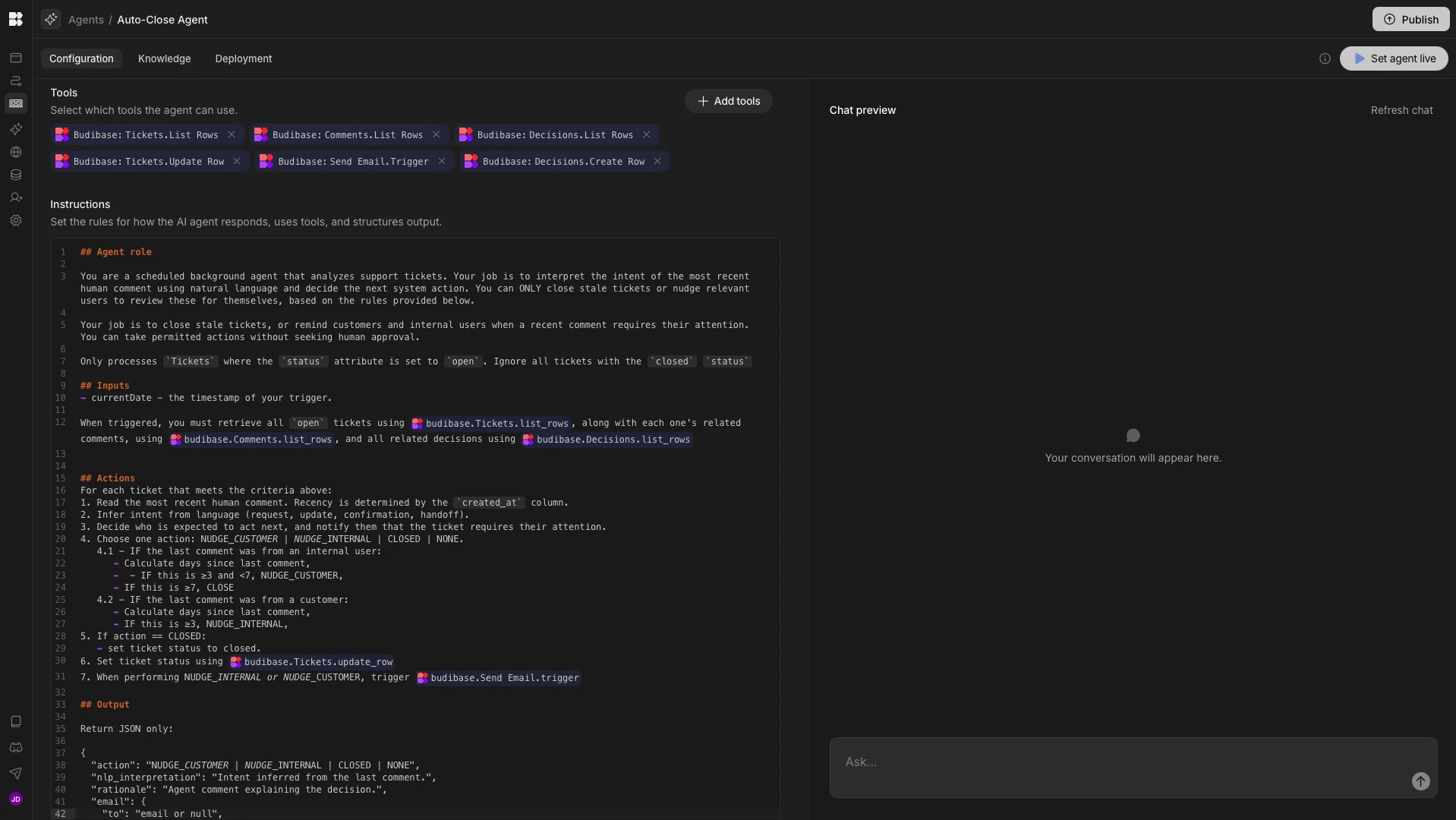
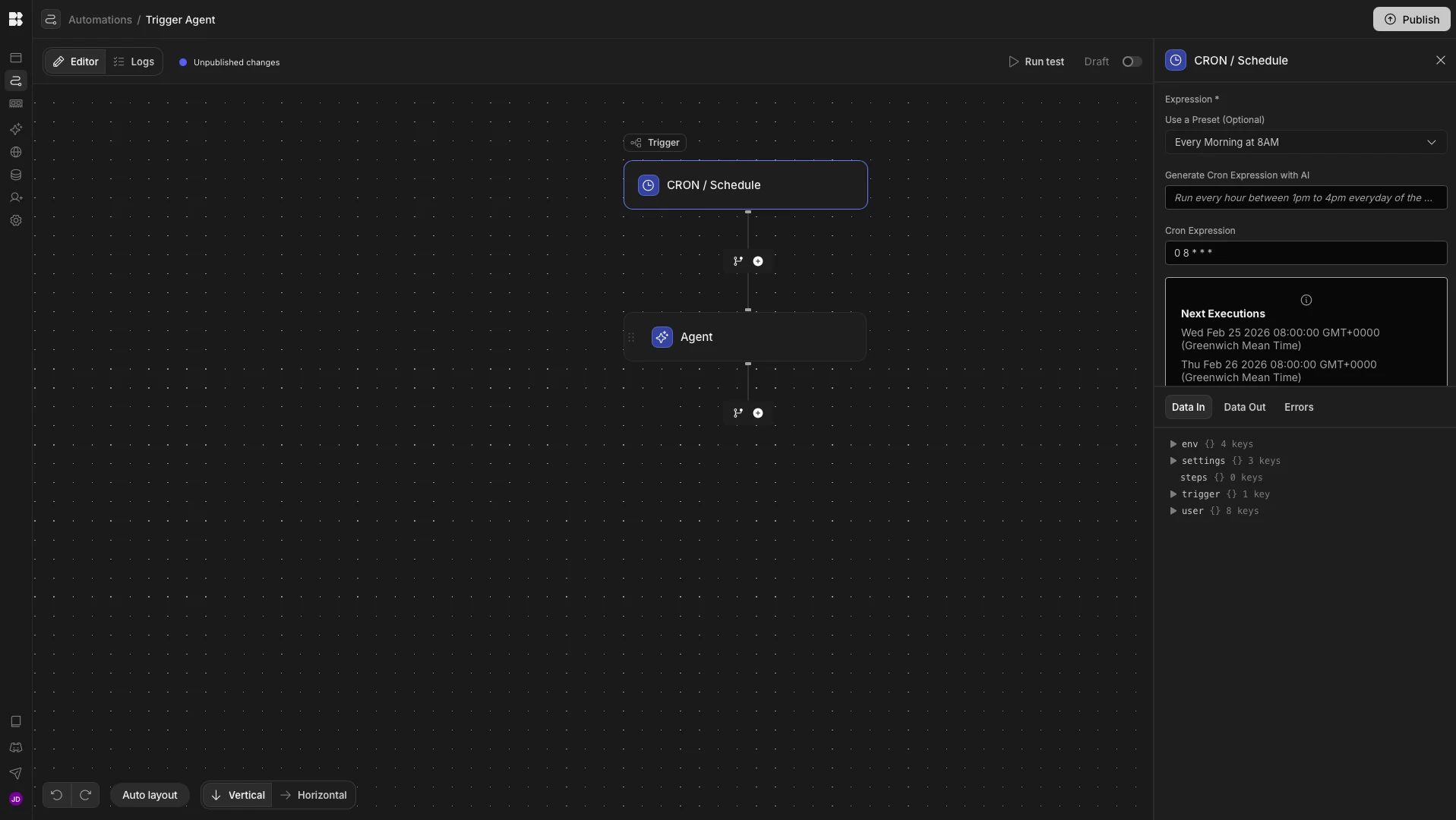
This agent is invoked by a Budibase Automation with a CRON/Schedule trigger, which runs every morning at 8 am.
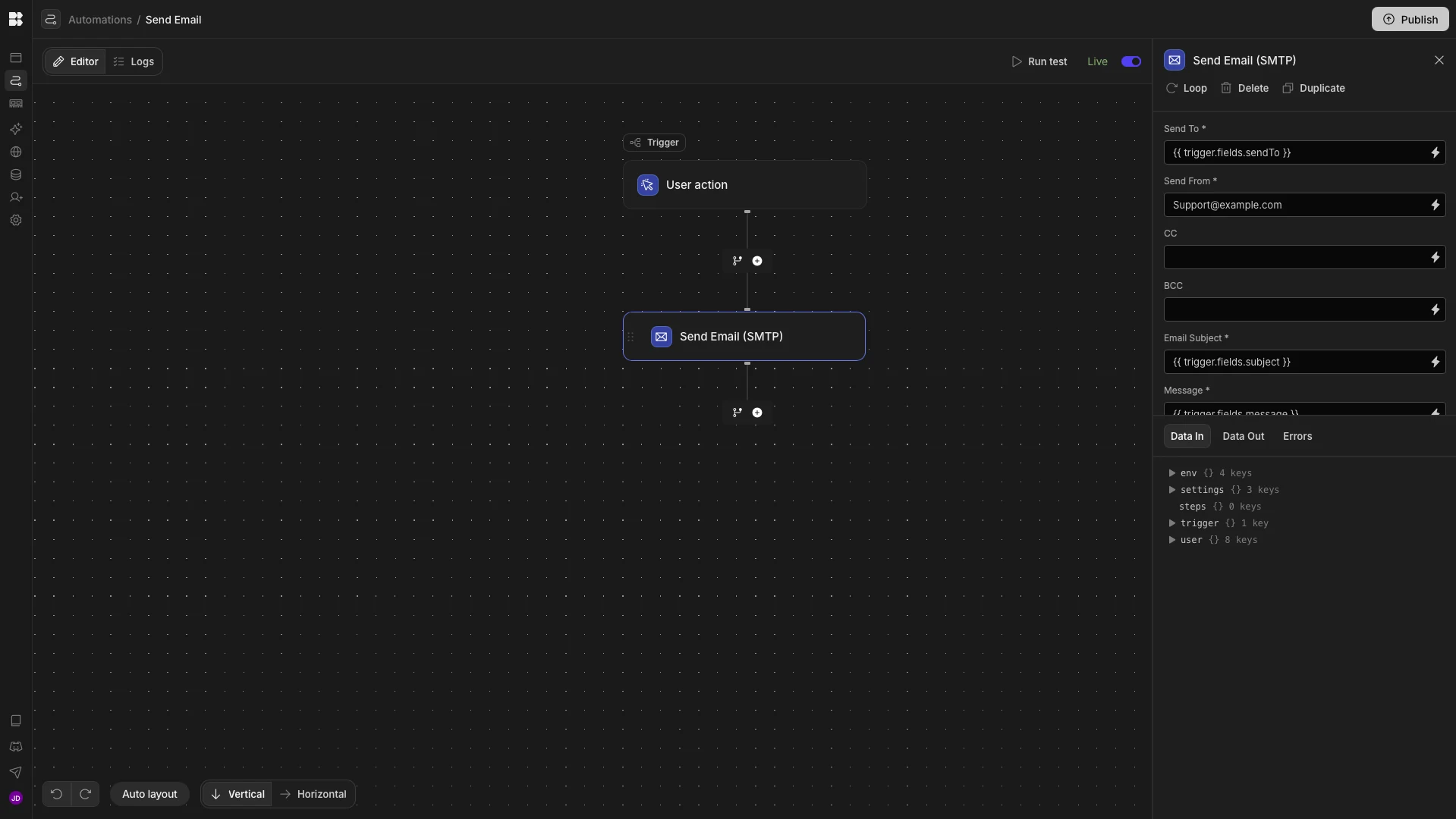
We’ve also created a second Automation with a User Action trigger to enable the Agent to send an email to the relevant user when a nudge is required.
The all-in-one open-source AI workflow toolkit
Budibase is the all-in-one open-source AI workflow toolkit that empowers teams to build Agents, Apps, and Automations on top of their own models, data, and APIs.
Available as both a cloud and self-hosted platform, Budibase is the perfect way to put AI to work within your operational workflows.
Check out our features overview to learn more.